 Console Mode
v1.6.0free and open source
Your PC becomes a console in one click.
It focuses the TV, turns the other screens off, switches the audio and launches Steam Big Picture, Playnite or Xbox mode. Quit the game and your desk comes back on its own.
or from a terminal:winget install lippdev.ConsoleMode
How it works
- 1
Pick the screen
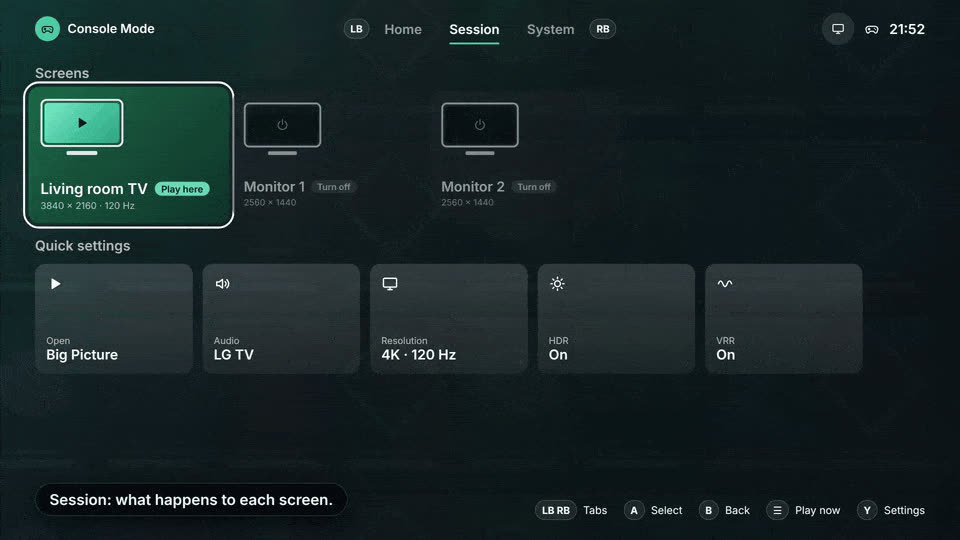
Open the app and pick the screen you play on. The others turn off.
- 2
Press Play now
Or use the desktop shortcut, or hold your controller shortcut with the app in the tray. On a new screen the TV asks "Can you see this screen?" and reverts on its own if nobody answers.
- 3
Play, then quit
Close Big Picture or Playnite and everything goes back: screens, audio and resolution.
From the couch, with a controller
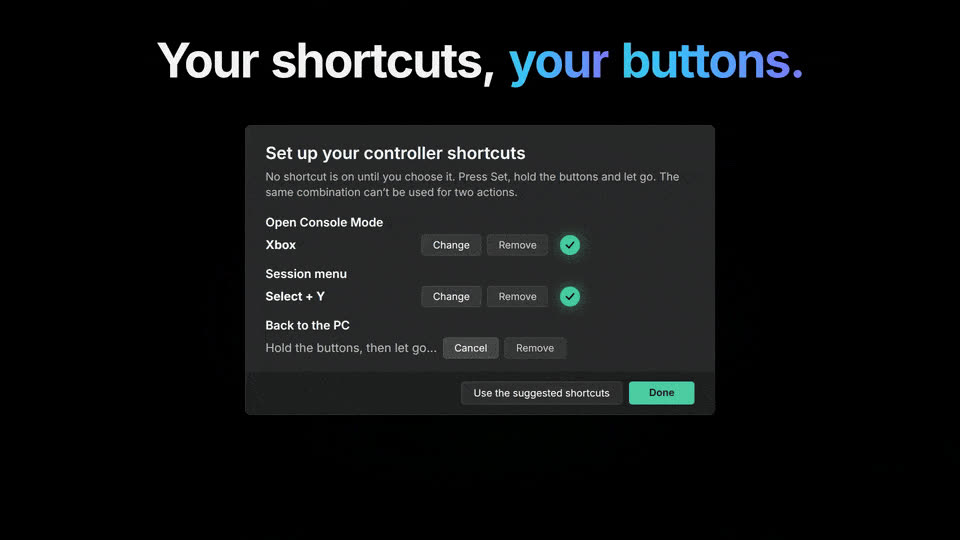
You pick the shortcuts: none is on at first, the app asks the first time you open it, and no button can do two things.
- your open shortcutenter console mode from the trayHome(Xbox / PS)
- your menu shortcutopen the menu over the game: open windows, files, volume, resolution, audio, FPS and HDRSelect+Y(Create + △)
- your back shortcutgo back to the PCStart+Select(Options + Create)
What it does
Hides the other screens
By disconnecting them, with black overlays or over DDC/CI, all through Windows' own APIs.
Takes the audio along
Sound goes to the TV (or any output) and comes back to the desk afterwards.
Resolution, HDR and VRR
Per-screen resolution and refresh rate, HDR, VRR and an FPS limit while you play.
FPS counter
Over the game, through RTSS: compact, detailed or your own layout.
Turns the TV on
Wakes a Google TV / Android TV over the network, switches it to the PC input and can put it to sleep afterwards.
Session menu
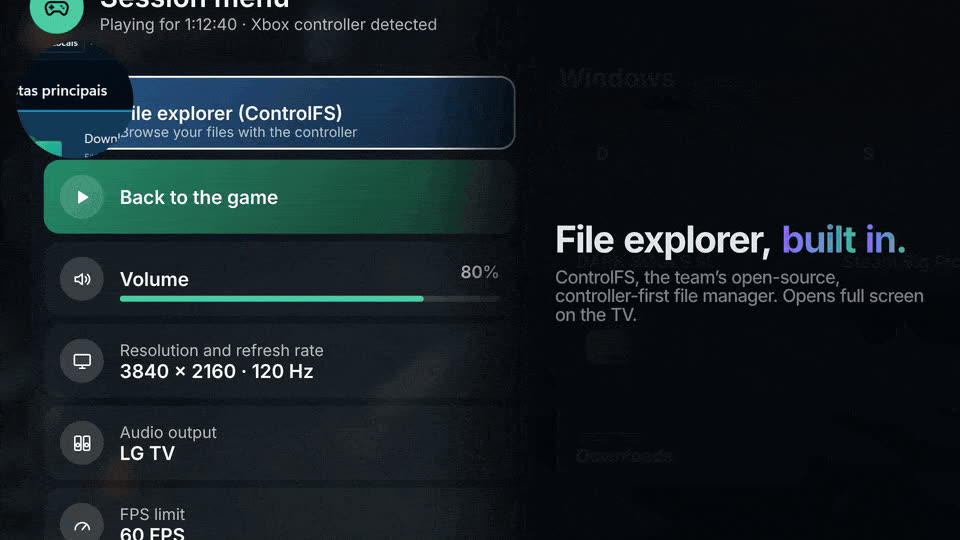
An overlay like Steam's: switch or close windows, change audio, resolution, FPS and HDR, and browse your files with ControlFS.
Two interfaces
Desktop, for the mouse, and Console, full screen for Xbox and PlayStation controllers, with your Steam covers as the background.
Automation
consolemode://start, stop and menu links for Stream Deck and scripts, plus a local control API.
Inside
New in 1.6.0
- A redesigned Console interface, with Home, Session and System tabs on LB/RB and your Steam covers as the background.
- A session menu like the Steam overlay, with the open windows in the middle (Alt+Tab for a controller).
- A built-in file explorer: ControlFS opens from the session menu.
- An FPS counter over the game through RTSS.
- Controller shortcuts you choose.
- Turns the TV on and switches it to the PC input.
- Screens and audio through Windows' own APIs only, with no third-party tools bundled.
Questions
Is it free?
Yes. Console Mode is free and open source under the AGPL-3.0 license. All the code is on GitHub.
Do I need admin rights to install it?
No. The installer installs for your user only and updates itself. The portable version is a single .exe that keeps its data next to it.
Windows warned me the file might be unsafe. Now what?
Releases are not code-signed yet, so SmartScreen or an antivirus may warn about the download. The source is open and the installer is built from it by GitHub Actions.
Does it work with a PlayStation controller?
Yes, Xbox and PlayStation (DualSense and DualShock, Bluetooth included). If the controller does nothing while Steam is open, turn off PlayStation support in Steam Input.
What about Xbox mode?
It works, but Windows does not tell when Xbox mode closes: to get your desk back, use Restore now or the tray menu.
I want to try new features early
Turn on Settings → "Receive test versions (alpha and beta)" and the app will offer them.
Ready to play from the couch?
Installs in a minute, no admin rights needed. It updates itself.